Explore Polyglot

Get Polyglot

For Apple Silicon · macOS 14.4+

Local AI. Your Mac.
Generate SRT from Audio or MP4 on Mac
Polyglot

From your recording
to a real SRT file.

Need an SRT rather than captions embedded in a video? Turn supported audio or MP4 into timed text, review it and export the file.

Download for Mac

Apple Silicon · macOS 14.4 or later · 3 free files

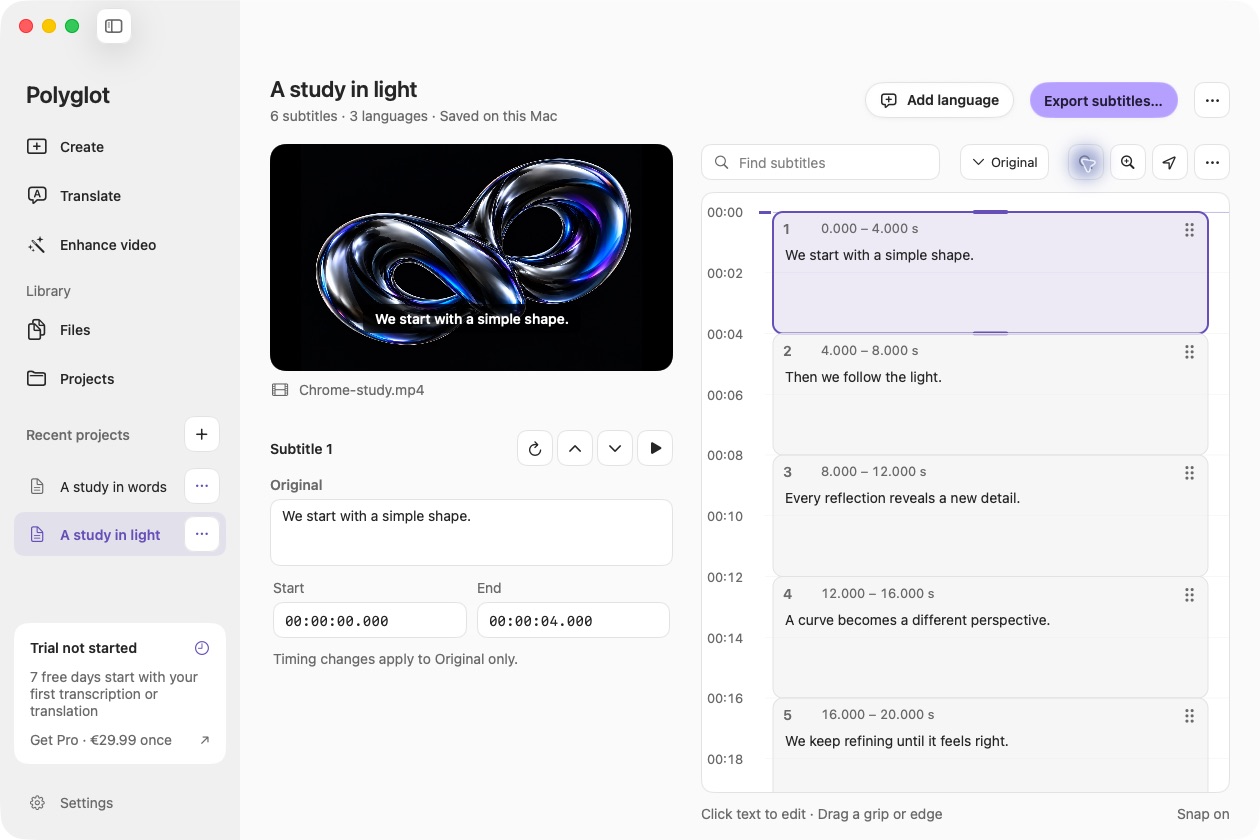
Actual Polyglot audio & mp4 to srt workspace with a prepared sample.
Actual Polyglot app · Prepared sample project · Select image to view full size
01

1. Import the final recording

Choose the audio or video version you intend to publish. An MP4 contains media, while an SRT contains timed text: this is speech transcription, not merely changing the file extension. Supported source speech is detected automatically.

02

2. Check the draft

Create subtitles, then compare the words with playback. Check names, numbers and the opening and closing cues. Text edits preserve source timing. If the source video changes later, verify that its SRT still matches the final edit.

03

3. Export UTF-8 SRT

Choose Export SRT for the selected language, or export all completed tracks. Keep the subtitle and matching media together, with clear language labels. Import the SRT into the receiving editor or platform and check the beginning, middle and end.

Before you begin.

Can I generate SRT from audio only?

Yes. A video track is not required for supported MP3, WAV, M4A and other readable audio.

Is this the same as converting VTT to SRT?

No. This workflow generates text from recorded speech. VTT/ASS file conversion is not included.

I already have subtitles. Do I need to transcribe again?

No. Use the SRT translator to translate existing subtitles while keeping their timing.

Keep creating.

Polyglot for Mac

Create your first subtitles.

Import a file, review the text, and export SRT.

Download for Mac

Apple Silicon · macOS 14.4 or later · 3 free files