Explore Polyglot

Get Polyglot

For Apple Silicon · macOS 14.4+

Local AI. Your Mac.
Subtitle Translator for Mac
Polyglot

Translate your subtitles.
Keep the original timing.

Create subtitles from your recording, then translate them into the languages your audience speaks. Your media and text stay on your Mac.

Download for Mac

Apple Silicon · macOS 14.4 or later

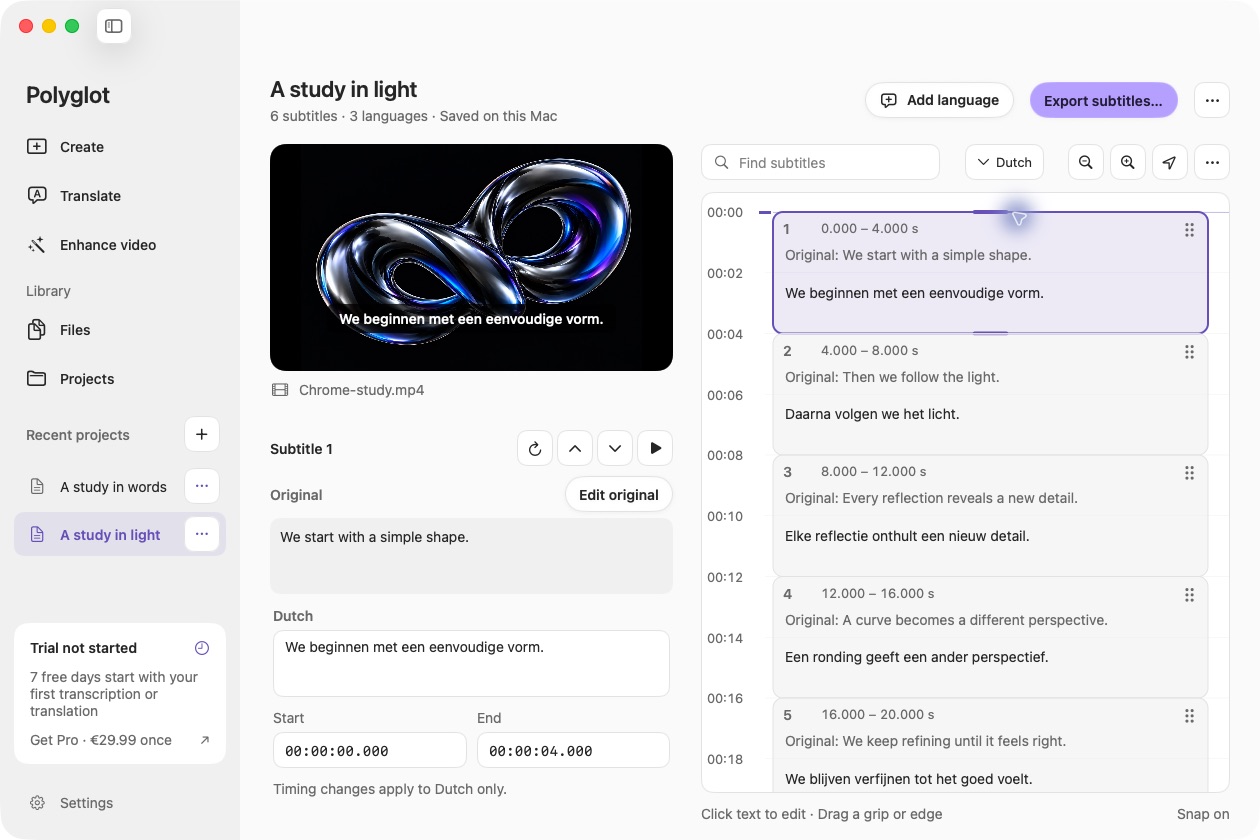
Polyglot showing Dutch subtitles with the original English text beneath each line.
Actual Polyglot app · Prepared sample project · Select image to view full size
01

One source, multiple languages

Polyglot first transcribes your media, then translates the resulting cues with a local language model. Choose several target languages or add a custom target.

02

Keep the timing. Refine the meaning.

Translations preserve the original cue timing. Review idioms, names and reading length as you edit; literal translation is not always the right subtitle.

03

Keep your edits under your control

Completed translations and manual edits are preserved. When source text changes, affected translations are flagged for review rather than silently replaced.

Frequently asked questions.

Can I import an existing SRT file?

The current workflow starts from audio, video or a saved Polyglot project. Standalone SRT import is not currently supported.

Is subtitle translation processed in the cloud?

No. The translation model runs on your Mac after its initial download.

Are speech recognition and translation languages the same?

No. Speech recognition supports 25 European languages. Translation targets are selected independently, and quality varies by language and content.

Polyglot for Mac

Create your first subtitles.

Import a file, review the text, and export SRT.

Download for Mac

Apple Silicon · macOS 14.4 or later