Explore Polyglot

Get Polyglot

For Apple Silicon · macOS 14.4+

Local AI. Your Mac.
SRT Translator for Mac — Multiple Languages
Polyglot

One SRT.
More languages.

Open the subtitles you already have. Choose one or more languages, translate locally, and export a separate SRT for each audience. No video required.

Download for Mac

Apple Silicon · macOS 14.4 or later · 3 free files

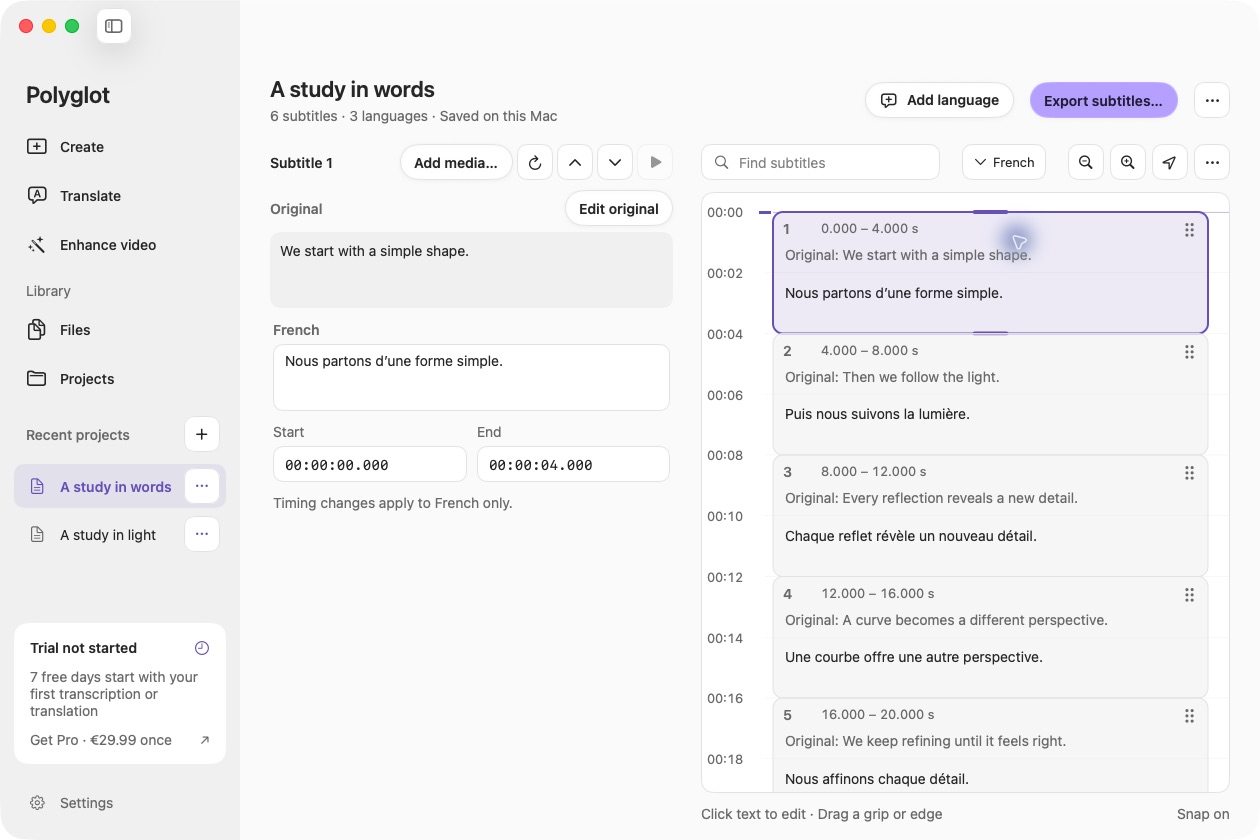
Actual Polyglot SRT translation workspace with a prepared sample.
Actual Polyglot app · Prepared sample project · Select image to view full size
01

Start with the finished subtitles

Choose Translate SRT in the sidebar or drop an SRT into Polyglot. The complete document is checked before import. UTF-8 and UTF-16 files are supported, including multiline text and overlapping cues. Malformed files show an error instead of silently losing lines.

02

Keep every cue in place

Polyglot preserves cue numbers, order and millisecond timing. Select one or more target languages, then translate on your Mac. Review names, terminology and reading length next to the source. If you have the video, attach it for an optional playback check.

03

Export one language or all of them

Save the selected track or export all completed languages into a new folder. Your source SRT stays untouched. Projects and partial translation progress save locally, so you can stop and continue. Add another language later without spending another free file.

Before you begin.

How does SRT translation use the three free files?

SRT translation and media transcription share one three-file allowance. An SRT counts once when its first complete translation is saved. Importing it, failed attempts and incomplete translations do not count. Additional languages for the same file are included.

Do I need the original video?

No. The SRT contains the text and timestamps. You can optionally attach a video for preview, but translation and export work without it.

Will my timing or cue numbers change?

No. SRT imports retain their original numbering, cue order, overlap and millisecond start/end times. Translated wording changes; review any inline styling and line length in the destination player.

Can it translate VTT or ASS files?

This feature accepts SRT. Convert other formats with a suitable subtitle editor first, reviewing any formatting lost in conversion. Polyglot does not currently provide VTT or ASS conversion.

Keep creating.

Polyglot for Mac

Create your first subtitles.

Import a file, review the text, and export SRT.

Download for Mac

Apple Silicon · macOS 14.4 or later · 3 free files