Apple Silicon · macOS 14.4 or later · 7-day free trial
Polyglot 1.11 · Prepared sample project
01
Generate subtitles from audio or video
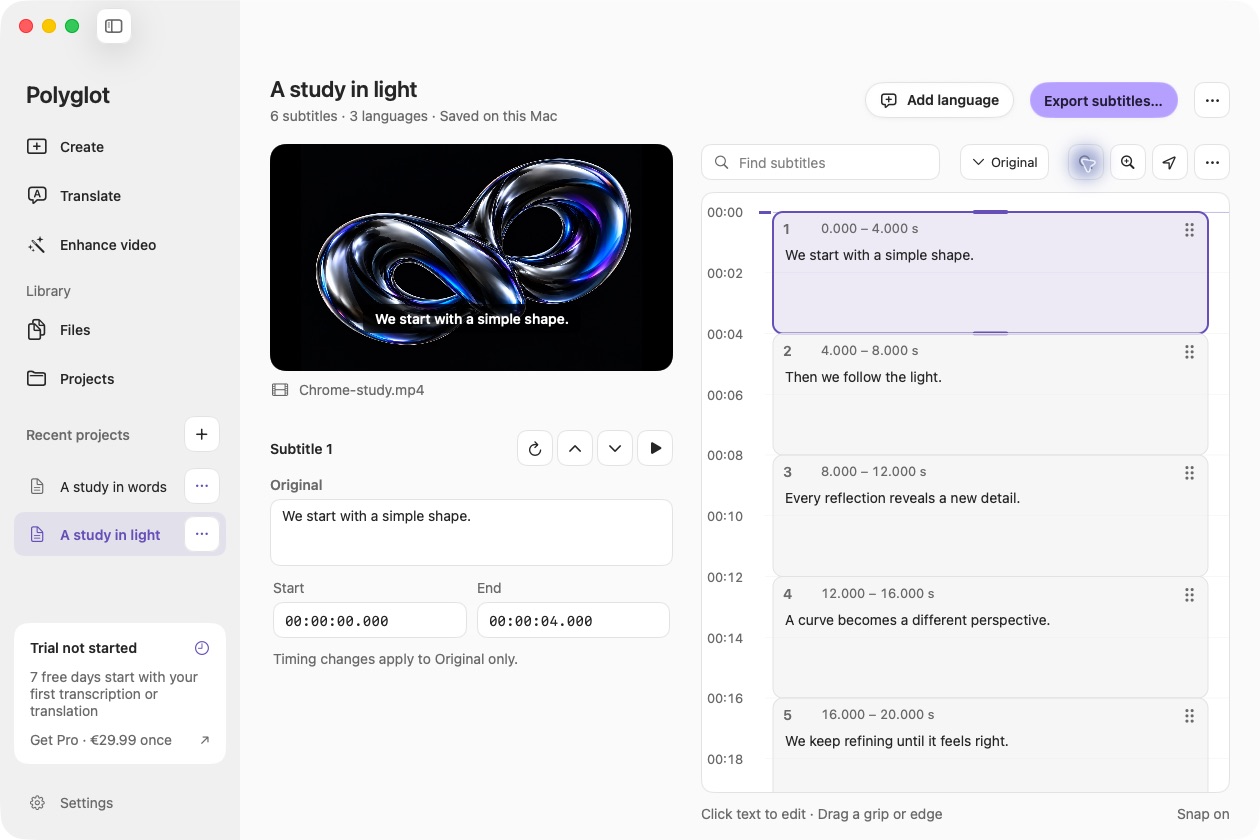
Choose Create in the sidebar and import a supported audio or video file. Generate the original subtitles first; translation is optional. Polyglot detects speech across 25 supported European languages and creates timed cues locally. Codec support depends on macOS.
02
Give the draft your attention
Review the original wording before adding other languages. Keep the media visible while reviewing cues in the vertical timeline. Click subtitle text to correct names and punctuation without changing its timing. Reopen the work from Projects or find its tracks in Files.
03
Export for the next step
Save SRT or WebVTT for a compatible editor or player, export a readable TXT transcript, or combine the original and one completed translation in bilingual subtitles. These are separate text files; captions are not burned into the video.
Before you begin.
Can I generate subtitles offline?
Yes. Download the speech model once to create original subtitles; add the translation model when you need another language, then process local files on your Mac. Model setup, video-link imports, purchase and activation require an internet connection.
Try unlimited transcription and translation for seven days, starting with your first processing job. No sign-in needed. After the trial, Pro keeps AI subtitle processing available. Saved projects remain yours to edit and export.
 Polyglot