Explore Polyglot

Get Polyglot

For Apple Silicon · macOS 14.4+

Local AI. Your Mac.
Video Transcription for Mac
Polyglot

Turn video into text.
With timing included.

Transcribe interviews, lessons and other videos into editable, timed text. Processing runs locally on your Mac.

Download for Mac

Apple Silicon · macOS 14.4 or later

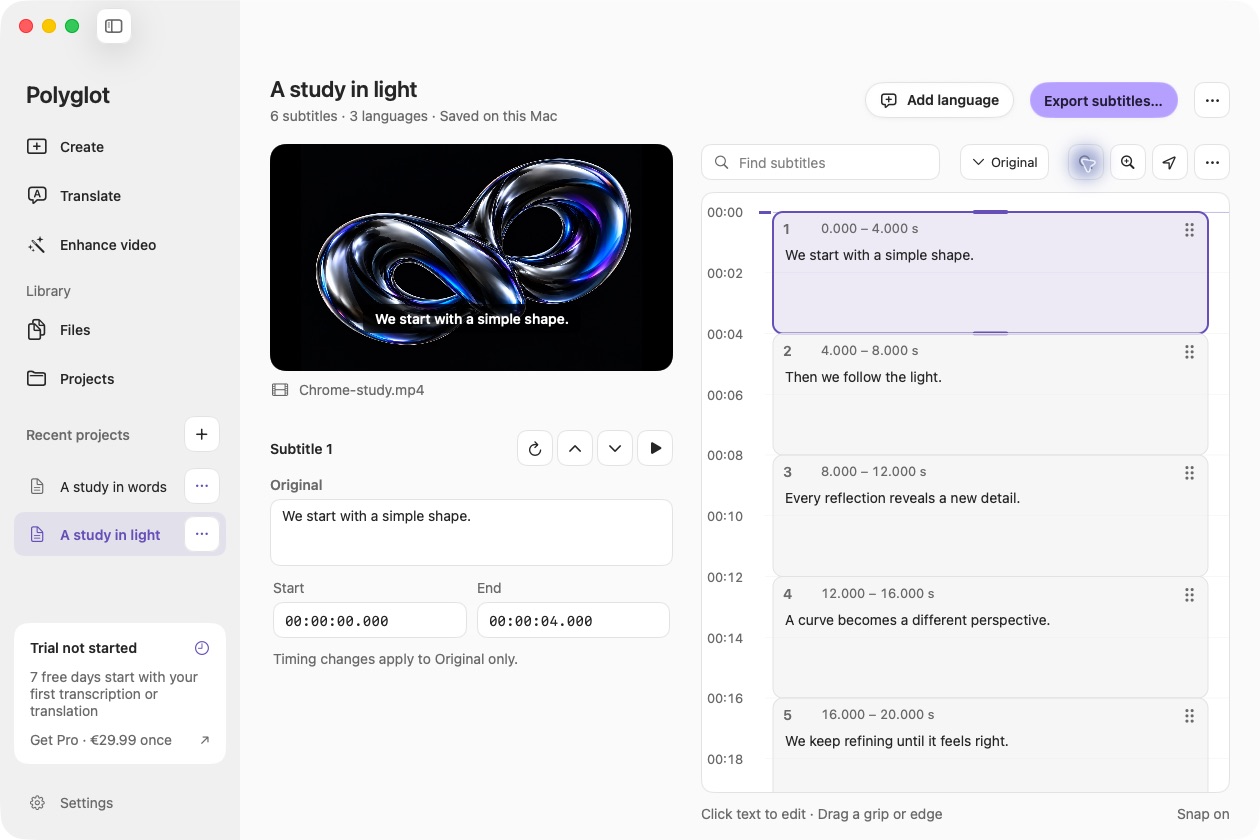
Polyglot’s subtitle editor showing video playback and editable, timed English subtitles.
Actual Polyglot app · Prepared sample project · Select image to view full size
01

Transcribe video to text, with timing intact

Move between timed cues and media playback to check what was said. Edit the original text directly and save your work as a local Polyglot project.

02

Local files or supported video links

Open macOS-supported media, including common MP4, MOV, M4A, MP3 and WAV files. Link imports require internet access and only work with supported, accessible videos.

03

A useful starting point for subtitles

Export your transcript as timed SRT cues, or translate it before export. Polyglot is a subtitle workspace; it does not promise speaker diarization or meeting summaries.

Frequently asked questions.

Does it work with audio-only files?

Yes. Supported audio files can use the same transcription and subtitle workflow.

What video formats are supported?

Support depends on codecs available through macOS. Common MP4 and MOV files work; a file extension alone does not guarantee compatibility.

Can I transcribe private or protected video links?

Private, password-protected, DRM-protected and still-live streams are not supported. Import a local file you are authorized to use instead.

Polyglot for Mac

Create your first subtitles.

Import a file, review the text, and export SRT.

Download for Mac

Apple Silicon · macOS 14.4 or later